Web compression in 2026: brotli, zstd, and compression patterns
A practical tour of compression in Go web servers: static assets, dynamic content, shared dictionaries, training, and streaming. Benchmarking brotli, zstd and gzip.
In this blog post I want to give an overview of several compression-related techniques and patterns that I've used personally or seen being used in real-world projects. To add some more dimensions, I also compare multiple compression algorithms (brotli, zstd, deflate, gzip) and give guidance to help you choose which algorithm suits a particular use case best. Full disclosure: I'm the author of molecule-man/go-brrr, a brotli port to pure Go, but I promise to be as unbiased as I can from now on.
TL;DR
- Precompress static assets with brotli at the highest level. It's the best ratio you can get and you pay for it only once.
- For dynamic content, benchmark brotli vs zstd on your own data. Neither wins universally.
- Shared dictionaries often beat switching algorithms: significant size reduction in my test.
- Trained dictionaries give roughly a 2x better ratio when you serve lots of small, similar records.
- Streaming reaches shared-dictionary-level ratios with none of the dictionary machinery.
- Compression can become a CPU bottleneck under high concurrency. Limit concurrency and adapt the level to load.
Trade-offs
There are 2 characteristics that matter for compression algorithms: speed and compression ratio. There is a natural trade-off between these characteristics: choosing algorithm+settings combos that produce a better compression ratio inevitably causes speed to decrease. There is no single universal algorithm that works best on all types of inputs. Some use cases favor zstd; in others brotli is the best option. Whenever you need to choose a compression algorithm, you'll have to measure which ratio-to-speed characteristics work best for your data profile.
Note that there are some derivative metrics that might be more useful in practice. E.g. if you host your web server in the cloud, then you care most about data bytes transferred and instance cpu, as you pay for both. Data bytes transferred is affected directly by the compression ratio, and instance cpu is affected directly by the compression speed. Some combination of algorithm and its settings will give you the optimal cloud cost for the particular content you serve.
There are other trade-offs like latency (speed and throughput are related but not always 1-to-1 with latency), memory, and browser support, which I'll mostly leave untouched in this blog post.
Static assets
Let's start with an easy case. This is literally a no-brainer. Static assets (js, css) can be pre-compressed in advance. You do it once when you release a new version of your server and then serve the pre-compressed stuff on every request. Since you do the compression only once, you don't care about the compression speed. You care only about the ratio. And the best ratio you can get is provided by brotli due to its static dict feature and the zopfli-style optimal parsing it does on the highest quality levels 10 and 11.
Here's a little experiment: I downloaded all the js and css sources linked in the source code of stackoverflow.com landing page and compressed all the files individually using all compression algorithms supported by modern browsers on their highest possible levels (except the last row):
| total size in bytes | vs raw | |
|---|---|---|
| raw | 2,311,611 | - |
| brotli | 417,121 | 18.0% |
| zstd | 450,494 | 19.5% |
| deflate | 520,025 | 22.5% |
| gzip | 520,867 | 22.5% |
| gzip (level 1) | 620,813 | 26.9% |
It's the year 2026 and stackoverflow.com still serves its static assets compressed with gzip at - checks notes - quality level 1: the fastest and the worst ratio (confirmed the gzip level 1 claim by gzipping the raw assets at level 1 myself and the output matched what stackoverflow serves byte-for-byte). It's just criminal. If stackoverflow switched to brotli precompression for the assets, it would reduce its asset data transfer by 32.8%. You might argue that stackoverflow optimizes for decompression speed here. I didn't run experiments in the browsers, but I'm not buying this theory, as empirical data from Go benchmarks suggests that there is no significant difference between gzip levels when it comes to decompression. At least in my experiments in Go on a handful of different files, the decompression of higher levels was even faster than level 1 decompression. See the decompression graphs in the Readme.
Ok, static asset precompression is nice and cool, but what if you don't control the Edge? It's very likely that you cache your static assets on a CDN like fastly, akamai or cloudflare. At my current job we use akamai and I've configured it to serve brotli-precompressed assets, so I can confirm it's supported there. I can also confirm that cloudflare supports pre-compressed assets - in fact this very blog that you're reading is served via cloudflare and is fully pre-compressed, including html, as it's all static content (which was of course absolutely unnecessary as I don't pay for traffic 🤪).
Dynamic compression
Ok, here things can get complicated, as we really need to weigh the pros and cons of every compression algorithm for our data profile. Since we agreed that static assets should be pre-compressed (and I'm inventing rules here because this is my blog post!), we need to figure out how to serve non-static assets, namely html.
To illustrate the idea I wrote a toy go webserver whose whole purpose is to serve a single file of my choice, compressed with one of
- brotli
- molecule-man/go-brrr - pure go variant
- cbrotli - cgo variant from google
- zstd
- klauspost/compress/zstd - pure go variant
- DataDog/zstd - cgo variant
- klauspost/compress/gzip - gzip from klauspost (faster than gzip in stdlib)
Rather than read all the data before serving, I did it in a more
memory-friendly way: the file is served using the streaming APIs of the above
libraries to emulate how a real webserver would serve real data. The compressors
Reset the sync.Pooled writers before writing (this allows more efficient
reuse of resources). Unfortunately cbrotli doesn't expose a Reset api for some
reason, so it wasn't possible to do a fully apples-to-apples comparison. I also
included a variant that uses ReadAll to read the full data and use the
non-streaming one-shot api of cbrotli, specifically for reasons I'll describe
later. Toy webserver
code
Let's say I'm trying to optimize my cloud provider costs and I pay for data bytes transferred (need best compression ratio) and instances cpu consumption (faster compression gives more economic cpu usage). If I were to optimize for latency I'd use the concurrent mode of zstd, but here I don't, as I optimize for throughput. To see which encoding gives me the cheapest serving of my data profile, I loaded my toy webserver with single-concurrency requests. My data profile is just a single random html page I scraped from github. In a real-world scenario you'd test your real server on your most-served content.
Here is the plot of my most important metrics, Bytes-per-request vs Throughput, on every available compression quality level (I included only 4 levels for gzip though). The smaller the Bytes-per-request and the larger the Throughput, the better. So the closer a point is to the bottom-right area, the better: I highlighted this zone in gray.
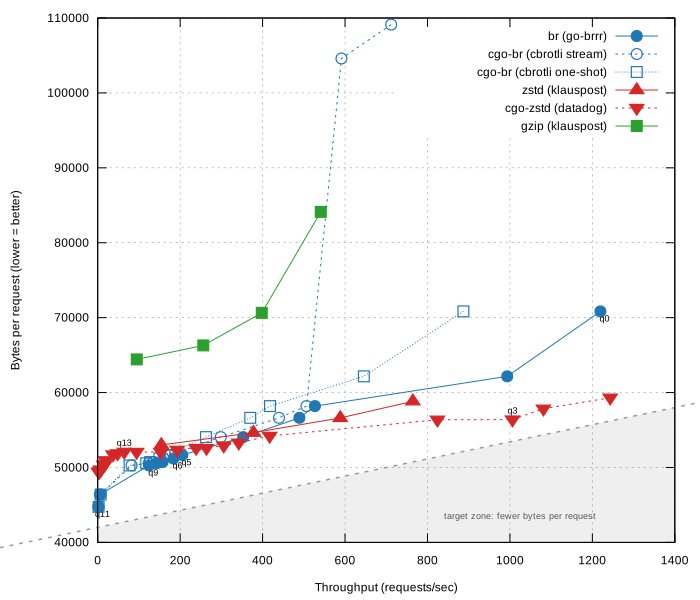
As you can see, this plot is very messy. Lots of lines are packed into a small space because several implementations cluster in the same ratio/throughput area. I'll try to make the plots clearer later in the post, but there are a couple of things we can notice immediately. Firstly, we can see that gzip really underperforms. It's so bad I won't consider it in the rest of the post; you really should use it only if the client supports none of the modern compression algorithms. Secondly, there is this weird, almost vertical offshoot of cbrotli which may give you the impression that cbrotli has a bad ratio and speed on those 2 quality levels (those are the fastest levels 0 and 1). This offshoot is the reason I added the one-shot variant of cbrotli, as it doesn't show the same behavior on levels 0 and 1. But that offshoot isn't actually a bug - it's a feature, and you can read about it under the spoiler if you're interested.
Why cbrotli behaves like that on levels 0 and 1
Levels 0 and 1 are the most resource-efficient levels. They are meant to be used as one-shot compressors. However, when the webserver serves the compressed data, it feeds it in 32KB chunks. Because of this one-shot approach, cbrotli compresses every 32KB chunk individually. This means that every next chunk is compressed without having the previous chunks inside the compression window, which affects the compression ratio. Why is this a feature? Because cbrotli's memory is bound to 32KB in this case and in theory should produce better latency.
go-brrr chose another approach. I decided to keep the whole compression window (2^LGWin) in memory for these 2 levels. This means that for the default LGWin=22, up to 4MB of window data will stay in memory, but the ratio will be much better. If you want to use go-brrr while keeping the cbrotli trade-off, then just set the LGWin property so that it matches the chunk size. E.g. set LGWin to 15 to match 32KB chunk sizes.
Now let's untangle that messy graph, and let's start with brotli. I removed quality levels 10 and 11. Those are really (like reeeeaaaally) slow, and you shouldn't use them for dynamic stuff. I also removed quality levels 0 and 1 to keep that cbrotli vertical offshoot from scaling the image so much that nothing is visible in the space where the important stuff is happening. So here is the comparison between brotli levels 2-9:
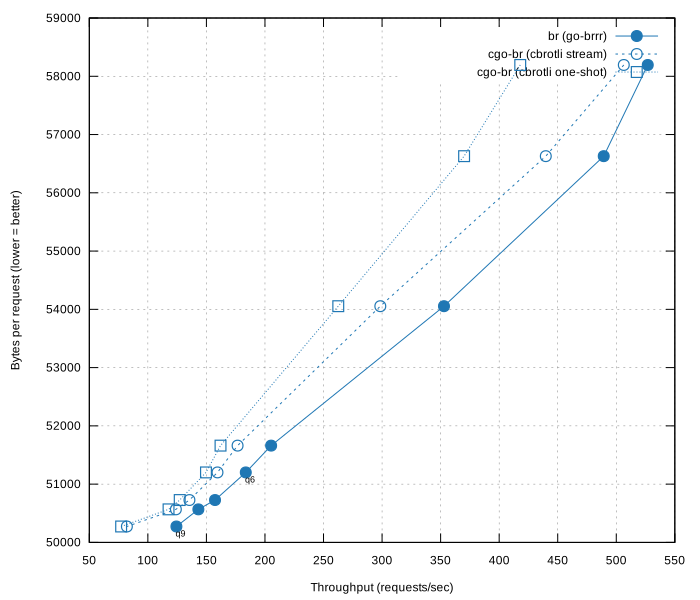
We can see that, at least on my 12th Gen Intel(R) Core(TM) i5-12500, and at least on this html data, there is a clear winner - go-brrr. That's not a coincidence - I've put a lot of effort into optimizing it. Of course, on your instance and your data profile things can look different.
Now let's untangle further and focus on the rest of the mess:
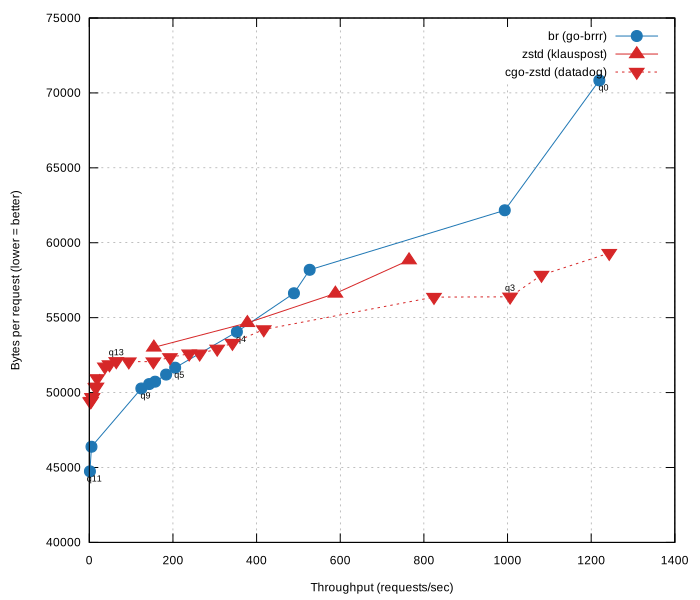
Here we can see that if you want only zstd, then you'd better use the cgo variant. It's faster and provides a larger quality level range to choose from. Since we started with zstd, also notice that the cgo zstd q13 level sits at a local maximum. This level is bad, you don't want to choose it; a couple of triangles to the right of it, e.g. level 11 (I didn't label it), is the better choice: almost the same compression ratio but better throughput. q3 is on the opposite end of the spectrum - it sits at a local minimum, so it can be a nice choice if its compression ratio suits your needs. Of course, on your instances and your data those local extremes might not be present at all.
Now let's see how go-brrr compares to zstd. We see that levels 5 through 9 (I labeled them q5 and q9) are doing better. If your throughput requirements are satisfied there, then you might want to prefer those brotli levels to zstd. And if you're constrained to pure go and can't use cgo, then the range of better brotli levels extends to q4. Other speed ranges favor zstd more.
I hope by now you agree with me that there is no generally superior compression
library and that everything depends on your data profile and your tolerance for
throughput and compression ratio. Everything has to be carefully benchmarked
before you can decide which compression lib and which compression level to use.
Of course, you might have other constraints as well: e.g. gzip and brotli are
both essentially universal across browsers and CDNs by now, while zstd
(Content-Encoding: zstd) is the newer one and its support is still catching up.
Or, as I already mentioned, you might optimize for latency, and then zstd is a
better choice as it has a concurrent mode.
Shared Dictionaries
Shared dictionaries, a.k.a. User dictionaries, a.k.a. Compound dictionaries, are one of the greatest features of zstd and brotli, which surprisingly few people know about. Seriously, literally none of the colleagues I talked about it with knew about it. I was shocked.
To simplify, dictionary-based compression algorithms work in such a way that the compressed data consists of a "dictionary" plus the actual compressed data, which looks like indexes that point into the dictionary.
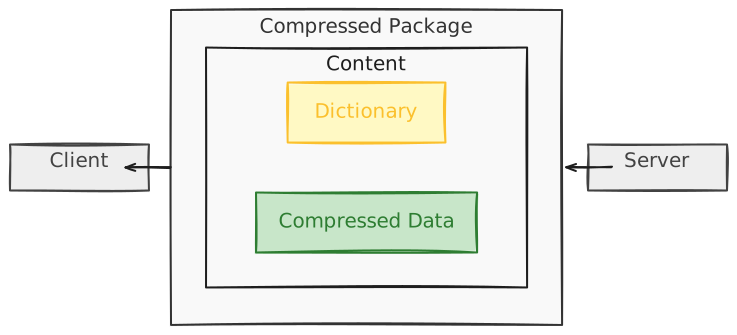
But then someone came up with a genius idea: what if we extract the "dictionary"
part and share it between the compressor and decompressor? Then, as long as both
the compression and decompression sides use the same shared dict, we can
significantly reduce the size of the payload we store or send over the wire. I
mean SIGNIFICANTLY. Just read on - you'll see for yourself.

Of course that image is an oversimplification, because there is still a small dictionary inside the payload for the data that wasn't found in the Shared dictionary.
Basically any binary or text file can be used as a shared dictionary. But usually people don’t use random files as dictionaries. If we talk about webservers, you could for example compress your ecommerce product html page and use another product html page as a dictionary. The data in those pages is similar enough for one of them to be used as a dictionary.
And browsers already support shared dictionaries. There are two special content
encodings: dcb for dictionary-compressed-brotli and dcz for
dictionary-compressed-zstd. Once the client has a matching dictionary cached it
advertises these in Accept-Encoding (along with an Available-Dictionary
header), and the server replies with the corresponding Content-Encoding.
Before you can use it you need to read the
docs, as dictionary negotiation and advertisement have to be carefully taken
care of: here is the good
source.
Enough theory and let's see it in action in my toy go webserver. This time I scraped 2 product pages from etsy:
Ironically etsy also uses gzip (WHYYYY?) and the page I was testing was 549KB (gzip-compressed to 125KB). Without further ado, let's see a table comparing go-brrr and klauspost zstd results, without and with a shared dictionary, on every level:
| Size in Bytes | Size with Shared dict | Speed MB/s | Speed with Shared dict (MB/s) | |
|---|---|---|---|---|
| zstd level=Fastest | 121,769 | 29,919 (-75.42%) | 733.80 | 1,172.00 (+59.71%) |
| zstd level=Default | 107,050 | 21,263 (-80.13%) | 269.63 | 1,076.19 (+299.13%) |
| zstd level=BetterCompression | 103,136 | 18,156 (-82.39%) | 154.53 | 316.70 (+104.94%) |
| zstd level=BestCompression | 102,036 | 16,940 (-83.39%) | 95.31 | 83.61 (-12.27%) |
| brotli level=3 | 112,013 | 17,353 (-84.50%) | 260.59 | 413.55 (+58.69%) |
| brotli level=4 | 106,165 | 16,965 (-84.02%) | 177.87 | 387.60 (+117.90%) |
| brotli level=5 | 100,238 | 15,870 (-84.16%) | 111.12 | 267.87 (+141.06%) |
| brotli level=6 | 98,897 | 15,659 (-84.16%) | 101.93 | 248.03 (+143.33%) |
| brotli level=7 | 97,690 | 15,547 (-84.08%) | 82.97 | 227.81 (+174.55%) |
| brotli level=8 | 97,308 | 15,516 (-84.05%) | 75.84 | 216.53 (+185.50%) |
| brotli level=9 | 97,074 | 15,441 (-84.09%) | 54.29 | 187.46 (+245.30%) |
| brotli level=10 | 87,411 | 14,278 (-83.66%) | 3.79 | 9.63 (+154.12%) |
| brotli level=11 | 86,639 | 13,904 (-83.95%) | 1.44 | 3.12 (+115.79%) |
The results are just amazing. The size is reduced by 84% and the speed is also improved significantly in almost every row. The 549KB page that is 125KB when served with gzip can be served as a 15KB binary. Amazing! By the way, I kept only the pure-go variants, as cbrotli doesn't expose shared dict support. On the following plot we can see how go-brrr compares to klauspost zstd with the Shared dictionary enabled:
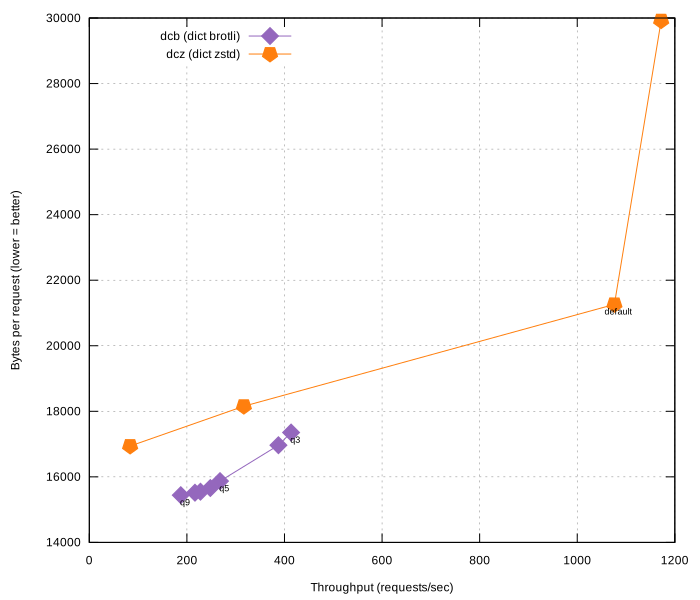
I must be unbiased here and praise zstd's speed at the default level. That is unbeatable. However, brotli shouldn't be discarded just because of that. On higher compression levels it produces better results - levels 3 through 9 have a better bytes-to-throughput ratio (at least on my machine on this particular data). Again, levels 10 and 11 are not included: too slow to be useful for dynamic data.
Dictionary Training
Let's consider a situation that requires you to repeatedly serve or store lots of similar, relatively small files. In this case you might find Dictionary Training especially handy. Both brotli and zstd provide a way to generate a dictionary optimized for your data profile. You feed production data into the trainer, it outputs a Shared dictionary, and you use it during compression and decompression.
To illustrate this cool feature I downloaded 5000 freely available IssueCommentEvents from Github Archive, which are quite similar to each other and therefore ideal for this showcase. I used 4900 events for dictionary training and 100 events for benchmarking.
Unfortunately the brotli cli doesn't give you dictionary training out of the box and you first need to build the dictionary generator binary, but it's really easy to do with bazel:
# the binary is stored in bazel-bin/dictionary_generator
Then I trained dictionaries of various sizes. By default zstd generates a
dictionary of size 112K, while brotli generates a 16K dictionary by default.
Both can be changed with --maxdict for zstd, and -t for the brotli generator.
Then I wrote a benchmark to measure compression ratios and throughput. This time I used only the pure go libs go-brrr and klauspost/compress/zstd. I used the one-shot api - this seemed logical for such small files. I used the EncodeAll api from zstd, as recommended by the docs for one-shot compression. Toy dict-serving webserver code (the code lacks dict negotiation and is only useful to show the compression ratio and throughput. Don't copy it verbatim).
The 100 files I ran the benchmark on were 1280KB in total, but the benchmark compressed them individually, as you would do in production.
I plotted the benchmark results. Here are the plots for all the trained dictionaries when used with zstd (I didn't label the levels; the faster levels are on the right):
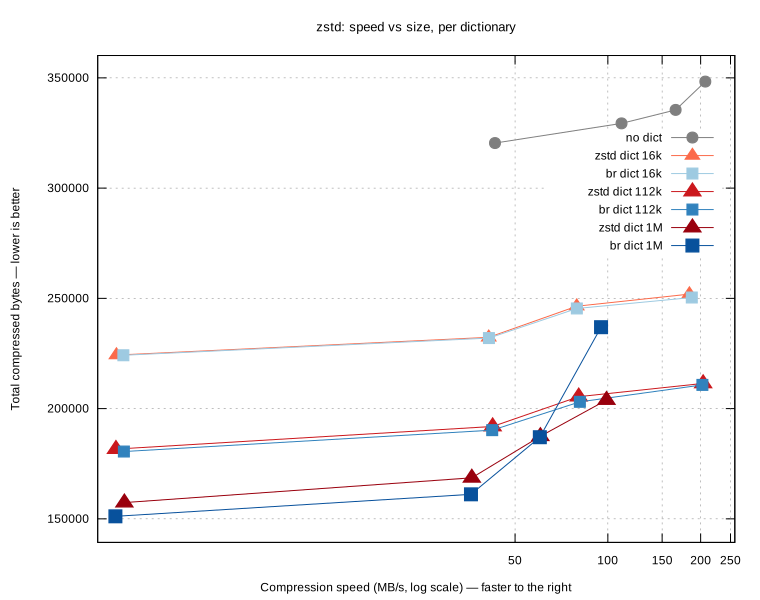
Did I just run zstd compression on both zstd and brotli dictionaries? Yes I did. How cool is that? I told you that you can use anything as a dictionary. And in this case we see that the brotli 1MB dictionary gives a good compression-to-speed ratio on the 3 highest levels - a neat "cross-pollination" option to know about, since the bigger dictionary captures more cross-file redundancy than a 112K one. Of course the 1MB will sit in memory and consume more space there - let's not forget about this trade-off, but anyway, this is cool.
Here are the go-brrr brotli plots on levels 3-11 (lower levels on the right). User dictionaries are only supported from level 3 in brotli as of now.
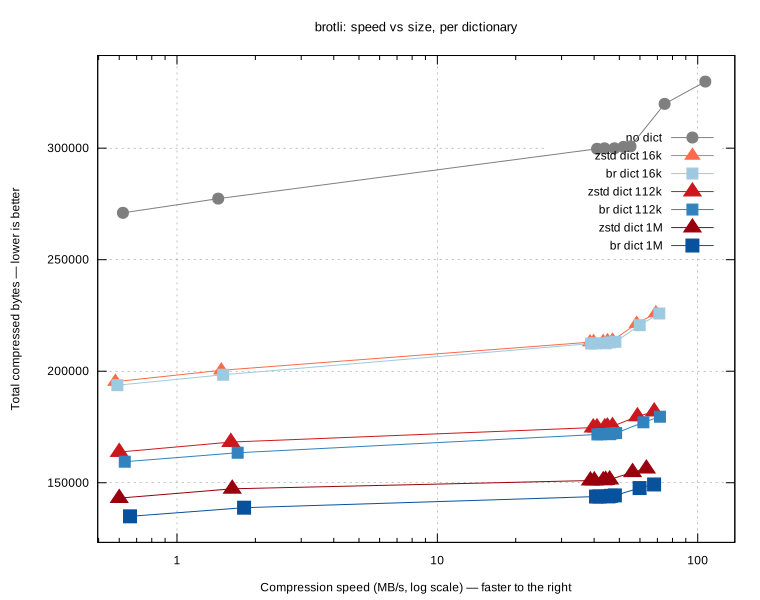
We can see that dicts of similar size perform very similarly. Here's a surprise, though: on this data zstd does slightly better with the brotli-trained dictionary than with its own. I'd have bet on the opposite, since zstd bakes optimized entropy tables into its dictionaries and in theory that should give it an edge. Which is exactly why you measure on your own data instead of assuming.
And here I'm comparing brotli with its own 112K dict and zstd with its own 112K dict:
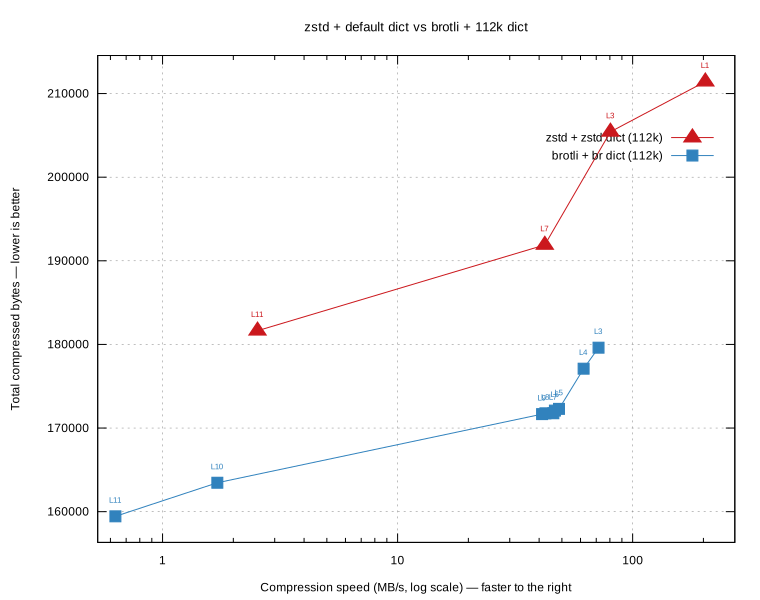
This time I labeled the points. zstd's L1, L3, L7, L11 correspond to SpeedFastest, SpeedDefault, SpeedBetterCompression, SpeedBestCompression exposed by klauspost/compress/zstd. L1 is much faster, but all of brotli's levels produce a better compression ratio.
So using trained dicts gives you an almost 2x better compression ratio, at least in this case where the compressed inputs are very similar. If you write lots of similarly shaped data, e.g. ecommerce product data or orders, you might benefit greatly from using trained dictionaries. At my job I applied trained zstd dictionaries to store product catalog data in dynamodb and got a 40% cost reduction on the dynamodb write api. Now I'd probably do it with brotli.
Streaming. Shared Dictionary Ratio Without Shared Dictionary
Now comes my favorite part, which has to do with the use case where you have one
long-lived context in which you compress many logically separate messages of more
or less the same shape. In this case you can "stream" your messages without ever
calling .Reset on your compression writer. Then the compressor keeps data from
previous messages alive inside the "window" and is able to back-reference the
previous data, producing greater compression.
The perfect example of such use case is SSE (Server-Sent Events) protocol. I again built a toy webserver to showcase SSE streaming compression in action. The code. I ran it in 3 modes: normal compression with reset; normal compression with reset and a trained shared dictionary (16KB); and streaming mode. This time I didn't measure speed, only compression bytes. I did it with brotli level 6 in all modes. The client was able to incrementally decode every event. I used those 100 Github events from the previous section as the data source. The plot below shows the cumulative bytes received by the client:
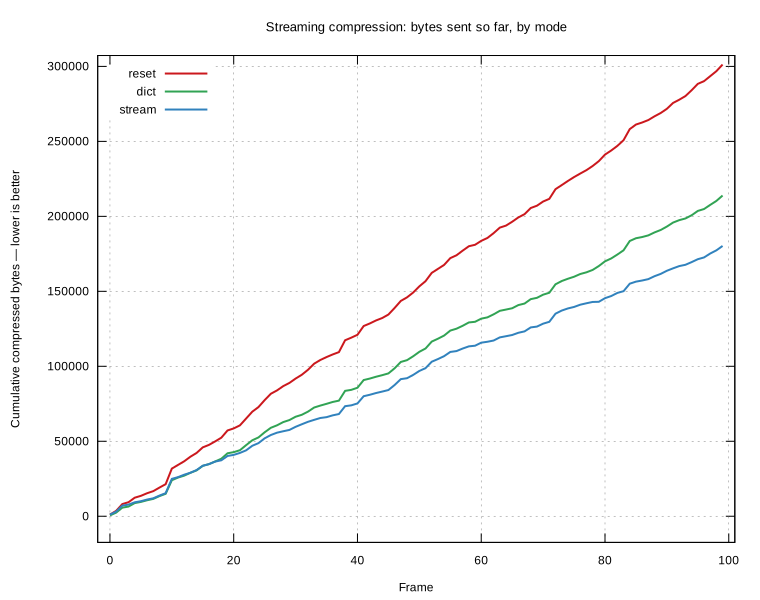
As you can see, the streaming mode produces an even better compression ratio than the trained dictionary (a larger dictionary would produce a better ratio, but I expect the streaming mode to be on par with it). Here is the comparison table of cumulative bytes:
| mode | cumulative bytes | vs raw | vs reset |
|---|---|---|---|
| raw | 1,095,631 | - | - |
| reset | 301,251 | −72.5% | - |
| dict | 213,889 | −80.5% | −29.0% |
| stream | 180,265 | −83.5% | −40.2% |
So you can get a Shared Dictionary level of compression ratio without needing to deal with all the inconveniences of supporting Shared Dictionaries.
Two caveats, though. First, the streaming win is bounded by the compression
window. My 100 events are ~1MB raw, and brotli's default 4MB window (LGWin=22)
can fit all of them - which is exactly why streaming is so good here. On a
genuinely long-lived stream that outgrows the window, the oldest data falls out
of it and the benefit plateaus. Second, because every message depends on the
compression state left by the previous ones, the decoder needs that state too.
With SSE this collides with reconnection: a reconnect opens a fresh response
stream with an empty window, so even though the protocol lets the client resume
from Last-Event-ID, you'd have to reset on reconnect (and produce a worse
ratio for the messages right after) or rebuild the context server-side. Worth
knowing before you apply this.
This pattern can be applied not only to SSE but to many other cases where you have a streaming-like interface:
- HTTP streaming. SSE is really just a standardized version of this.
- Custom protocols that use new-line separated jsons: NDJSON streams.
- WebSocket is also a long-lived stream.
- Event logs. I mean Kafka-like systems or redis streams.
- Log shipping. Sending data to systems like newrelic or elasticsearch. This is a massive opportunity, I think.
- Database replication.
Importance of concurrency
All the graphs so far have shown performance on one cpu. The chances are high that you have more than 1 cpu on your server. If I repeat the same benchmark from a couple of sections ago but with concurrency=2, I get double the throughput numbers (because I have more than 1 cpu).
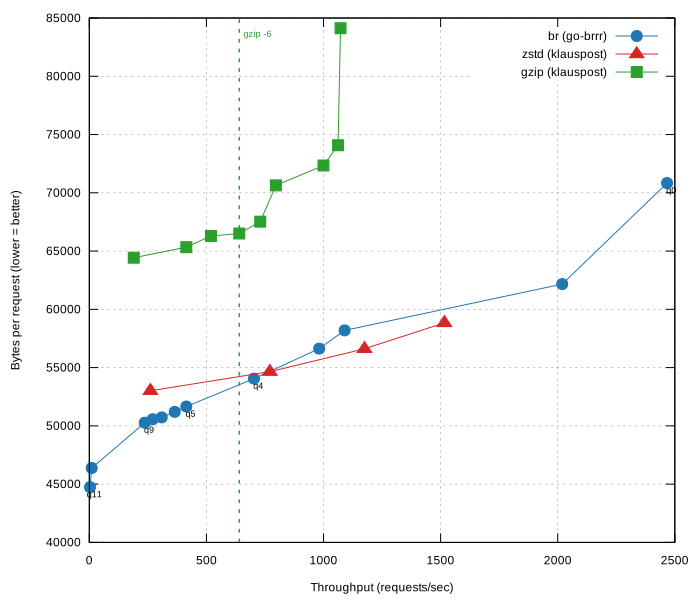
The throughput at the gzip default level (6) is ~640 requests per second. But what is this number actually? It tells you at what point the compression on this level on this instance with 2 cpus will become a bottleneck.
Typical webservers are IO bound, not CPU bound. And you want them to stay IO bound. However, if you increase concurrency more and more, at some throughput your webserver will become CPU bound because of the compression, and this is a bad thing, because then your server will become dangerously slow (if it didn't crash because of Out-Of-Memory already).
An anecdote from my job. We experienced a DDOS attack that Akamai's DDOS protection wasn't able to absorb. The concurrency skyrocketed to 90, which was way too high: the gzip compression became a bottleneck. This caused dangerous cascading issues: the server itself became very slow, which made the redis client appear slow as well (the redis server stayed healthy - it didn't feel the attack at all). As the redis client became slow, it started to time out. The timeout errors were treated as cache misses - this was by design, as we didn't want to treat redis as an HA cache. 40k requests that would normally be served from cache went through and hit backend services, causing the same kind of issues there as well.
Moral of the anecdote: add concurrency-limiting middleware and make sure the compression bottleneck is not reachable. You can also adapt the compression level to the current load. When the cpu is under pressure, drop to a faster (lower) level and trade the ratio for CPU.
Practical recommendations
| Scenario | Recommendation |
|---|---|
| Static JS/CSS/HTML | Precompress with brotli at level 11 |
| Dynamic HTML | Benchmark brotli vs zstd; both beat gzip |
| Many similar documents (e.g. product pages) | Shared dictionaries (dcb/dcz) |
| Lots of small, repetitive records | Trained dictionaries |
| Long-lived streams (SSE, WebSocket, logs) | Streaming without Reset |
| Clients without a modern codec | gzip fallback |
| Already-compressed data (images, video, woff2) and maybe small files below 1KB | Don't compress |
Wrapping up
It's almost a stereotype that brotli is slow and zstd is fast. My claim is that it's not universally true. It depends on what data you compress, and very often brotli has an edge at the higher compression ratios, even in terms of speed.
However, the biggest gains can be achieved not by switching to brotli or zstd, but by being smarter about more advanced techniques: shared dictionaries and streaming.
And always measure. Every plot in this post came with the same caveat: it was like that on my machine with the data I cherry-picked. Your workload is the only one that matters for you.